




Opsgenie is going away. The migration should not be a fire drill.
Opsgenie support ends 5 April 2027. Here is what teams need to consider beyond simply moving their data to Jira Service Management.
JUL 22, 2026 - 5 MINS READ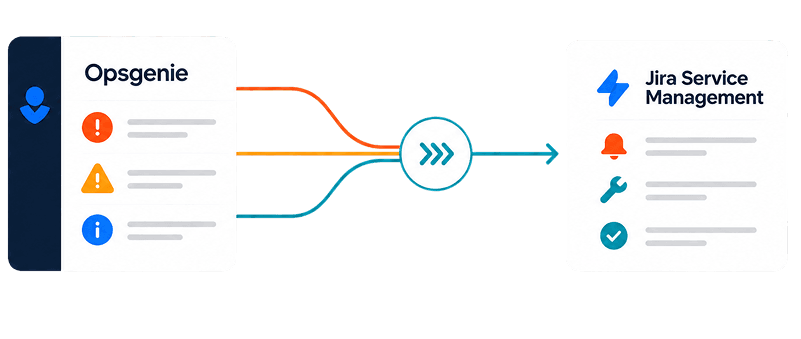
The 5 April 2027 deadline is fixed. Teams still using Opsgenie should start planning well before the cutoff.
Migration is more than moving data. Alert routing, on-call schedules, escalation policies, integrations, and incident workflows all need to be accounted for.
Audit before you rebuild. Understanding the existing Opsgenie environment gives you a clear migration baseline and exposes gaps early.
Test before cutover. Rebuilding and validating integrations, alerts, notifications, and escalation workflows reduces the risk of disruption.
Plan for continuity. A structured migration, including rollback planning and a controlled transition, gives teams room to resolve issues before relying fully on the new environment.
Ready to plan your migration?
Get a clear view of your current Opsgenie setup and a structured path to Jira Service Management before the deadline.
Opsgenie support ends on 5 April 2027. For teams still relying on Opsgenie for alerting, on-call schedules, escalation policies, and incident response, the deadline is fixed. But the real challenge is not simply moving data from one Atlassian product to another.
It is making sure the incident management operation your teams depend on continues to work when the switch happens.
Atlassian has confirmed that Opsgenie will no longer be accessible after 5 April 2027, and customer data that has not been migrated will be deleted. Atlassian is moving Opsgenie's capabilities into Jira Service Management and, for some DevOps use cases, Compass.
That makes migration a technology decision, but it is also an operational one.
The migration is bigger than the data
An Opsgenie environment is rarely just a collection of alerts.
Over time, teams build alert routing, on-call rotations, escalation policies, integrations, notification preferences, and incident workflows around it. Those configurations become part of how the organization responds when something goes wrong.
A successful migration therefore needs to answer more than:
“Did the data move?”
It needs to answer:
Do alerts still reach the right people?
Do on-call schedules work as expected?
Are escalation policies configured correctly?
Do integrations still trigger the right actions?
Can teams respond to incidents through their existing channels?
Are historical records and important configurations available where they need to be?
Have deprecated features been replaced with workable alternatives?
Atlassian's own migration documentation distinguishes between features that migrate automatically, features that require configuration, and features that have been deprecated or replaced.
That distinction matters.
A migration can technically complete while still leaving operational gaps.
Start with the environment you have
Before deciding how to migrate, understand what is actually running today.
That means auditing the current Opsgenie environment, including alert routing, on-call rotations, escalation policies, integrations, notification methods, and the way teams use incident management.
This gives you a baseline for the migration rather than forcing your team to discover missing pieces after the cutover.
For teams using Jira Service Management Data Center, there is an additional consideration. Atlassian's current migration guidance requires a move to Jira Service Management Cloud before Opsgenie can be migrated through the available migration path.
The right destination therefore depends on your existing Atlassian environment, not simply on the fact that Opsgenie is being retired.
Build and test before you cut over
The safest migration is not one where the new environment is configured on the day the old one disappears.
It is one where the new environment has already been tested.
That means rebuilding integrations, validating alert routing, checking escalation behaviour, testing notifications, and making sure the people responsible for incident response understand the new environment.
Atlassian recommends preparing stakeholders and reviewing post-migration tasks before the scheduled migration date. Migrations can be scheduled at least seven days ahead, giving teams a defined window to prepare.
For more complex environments, we would go further.
We recommend a structured migration with a clear testing period, rollback planning, and a controlled transition so that teams are not discovering problems during a live incident.
Ready to plan your migration?
Start with an assessment of your Opsgenie environment and get a clear path to Jira Service Management before the deadline.
Do not leave the deadline until the end
There is a temptation to treat April 2027 as the project start date because Opsgenie continues to work until then.
That is the wrong way to think about the deadline.
The deadline is the latest point by which the migration needs to be complete, not the date when planning should begin.
The earlier you understand your environment, the more time you have to identify dependencies, resolve configuration gaps, test integrations, train teams, and deal with anything that does not migrate cleanly.
There is also a data consideration. After Opsgenie is shut down, only migrated data will remain available in Jira Service Management, while data that has not been migrated will be permanently deleted.
A better way to approach the move
At Alluvium, we treat an Opsgenie migration as an operational transition rather than a simple product replacement.
Our approach covers:
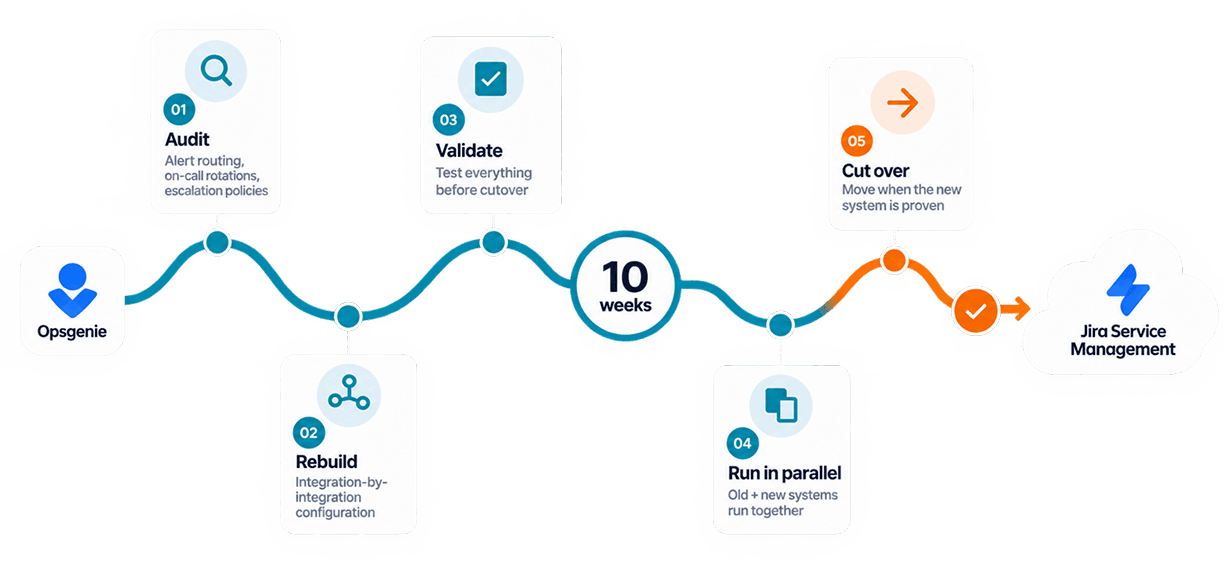
01. Assess — Audit your existing alerting, on-call, escalation, integrations, and incident workflows.
02. Design — Map the current environment to the appropriate Jira Service Management destination and identify anything that needs to be redesigned or replaced.
03. Build — Configure the new environment and rebuild integrations and workflows.
04. Test — Validate the migration integration by integration and test the workflows your teams depend on.
05. Transition — Move to the new environment with a controlled cutover and a clear rollback plan.
The goal is simple: when the migration is complete, your teams should be able to respond to incidents with confidence rather than wondering what changed.
The deadline is fixed. Your migration plan should be too.
5 April 2027 may sound far away, but complex service environments take time to understand and test properly.
If you are still running Opsgenie, now is a good time to establish what needs to move, what needs to change, and how long the transition will realistically take.
Alluvium runs structured Opsgenie-to-Jira Service Management migrations, including assessment, configuration, integration testing, rollback planning, and transition support.
Book a migration assessment